RHCSA Rapid Track
Use Red Hat Insights to analyze servers for issues, remediate or resolve them, and confirm that the solution worked.
Red Hat Insights is a predictive analytics tool to help you to identify and remediate threats to security, performance, availability, and stability on systems in your infrastructure that run Red Hat products. Red Hat delivers Red Hat Insights as a Software-as-a-Service (SaaS) product, so that you can deploy and scale it with no additional infrastructure requirements. In addition, you can take advantage of the latest recommendations and updates from Red Hat that apply to your deployed systems.
Red Hat regularly updates the knowledge base, based on common support risks, security vulnerabilities, known-bad configurations, and other issues that Red Hat identifies. Red Hat validates and verifies the actions to mitigate or remediate these issues. With this support, you can proactively identify, prioritize, and resolve issues before they become a larger problem.
For each detected issue, Red Hat Insights provides risk estimates and recommendations on how to mitigate or remediate the problem. These recommendations might suggest materials such as Ansible Playbooks, or provide step-by-step instructions to help you to resolve the issue.
Red Hat Insights tailors recommendations to each system that you register to the service. To start using Red Hat Insights, install the agent in each client system to collect metadata about the runtime configuration of the system. This data is a subset of what you might provide to Red Hat Support by using the sosreport command to resolve a support ticket.
You can limit or obfuscate the data that your client systems send. By limiting the data, you might block some analytic rules from operating, depending on what you limit.
After you register a server and it completes the initial system metadata synchronization, you should be able to see your server and any recommendations for it in the Insights console in the Red Hat Cloud Portal.
Red Hat Insights currently provides predictive analytics and recommendations for these Red Hat products:
Red Hat Enterprise Linux 6.4 and later
Red Hat Virtualization
Red Hat Satellite 6 and later
Red Hat OpenShift Container Platform
Red Hat OpenStack Platform 7 and later
Red Hat Ansible Automation Platform
When you register a system with Red Hat Insights, it immediately sends metadata about its current configuration to the Red Hat Insights platform. After registration, the system periodically updates the metadata that it provides to Red Hat Insights. The system sends the metadata with TLS encryption to protect it in transit.
The Red Hat Insights platform analyzes the received data, and displays the result on the https://console.redhat.com/insights site.

Use the rhc connect command to register your system to Red Hat and enable Red Hat Insights with a single command.
[root@host ~]# rhc connect -a host_key -o 117018
Connecting host.lab.example.com to Red Hat.
This might take a few seconds.

● Connected to Red Hat Subscription Management
● Connected to Red Hat Insights
● Activated the Red Hat connector daemon

Manage your Red Hat connector systems: https://red.ht/connectorInsights is included with Red Hat Enterprise Linux 9 as part of the subscription. Earlier versions of Red Hat Enterprise Linux servers required installing the insights-client package on the system. The insights-client package replaced the redhat-access-insights package starting with Red Hat Enterprise Linux 7.5.
The Insights client periodically updates the metadata that is provided to Insights.
Use the insights-client --register command to register the system with the Insights service and to upload initial system metadata.
[root@host ~]# insights-client --register
This host has already been registered.
Automatic scheduling for Insights has been enabled.
Starting to collect Insights data for host.lab.example.com
...output omitted...

Writing RHSM facts to /etc/rhsm/facts/insights-client.facts ...
Uploading Insights data.
Successfully uploaded report from host.lab.example.com to account 60766.
View the Red Hat Insights console at https://console.redhat.com/insights/
View details about this system on console.redhat.com:
https://console.redhat.com/insights/inventory/a47b1970-750b-4ff2-b79e-825efea65
Use the insights-client command to refresh the client's metadata.
[root@host ~]# insights-client
Starting to collect Insights data for host.lab.example.com
...output omitted...
Writing RHSM facts to /etc/rhsm/facts/insights-client.facts ...
Uploading Insights data.
Successfully uploaded report from host.lab.example.com to account 60766.
View details about this system on console.redhat.com:
https://console.redhat.com/insights/inventory/a47b1970-750b-4ff2-b79e-825efea65e
On Red Hat Insights (https://console.redhat.com/insights), ensure that you are logged in and that the system is visible under the section of the web UI.
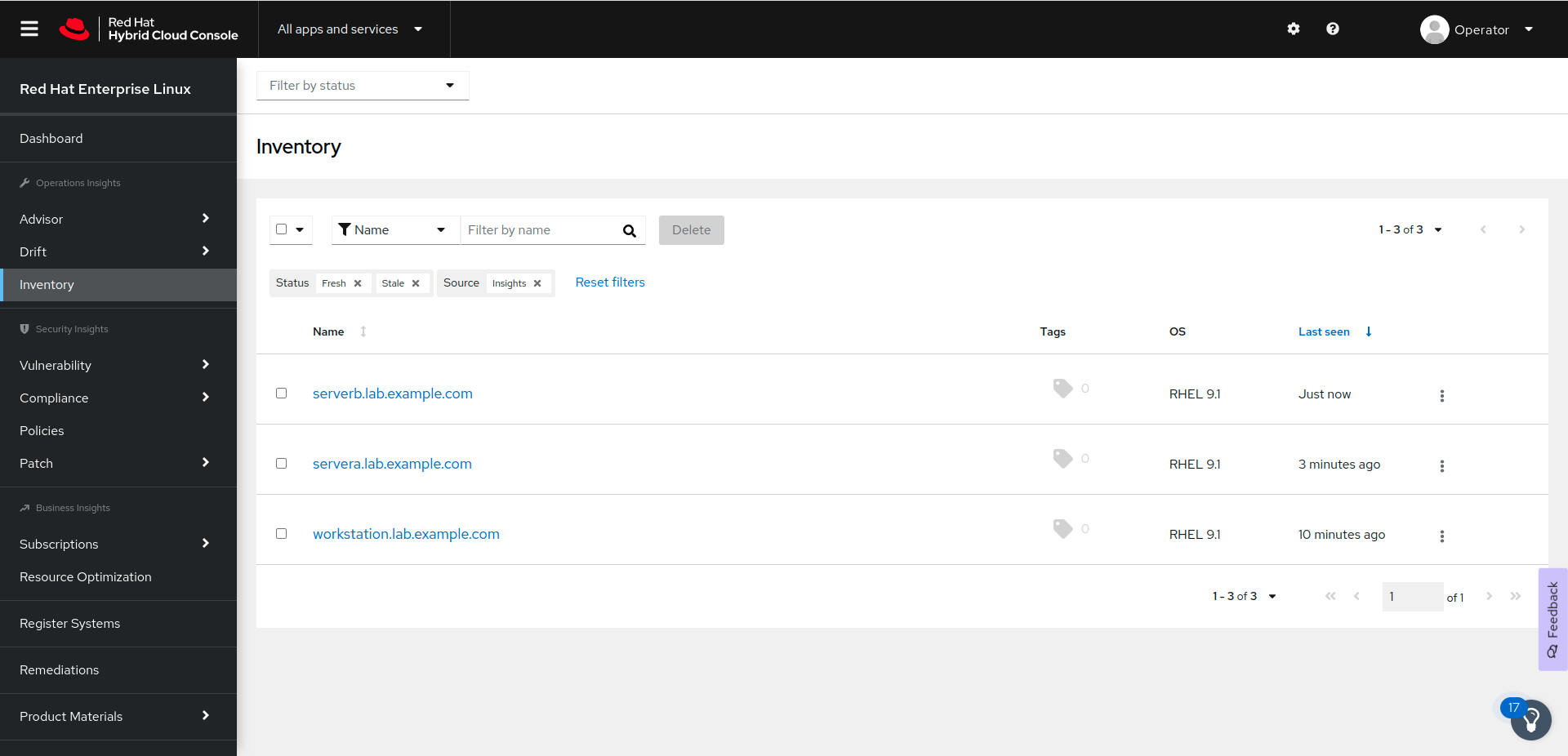
Red Hat Insights provides a family of services that you access with a web browser at the https://console.redhat.com/insights website.
The Advisor service reports configuration issues that impact your systems. You can access the service from the → menu.
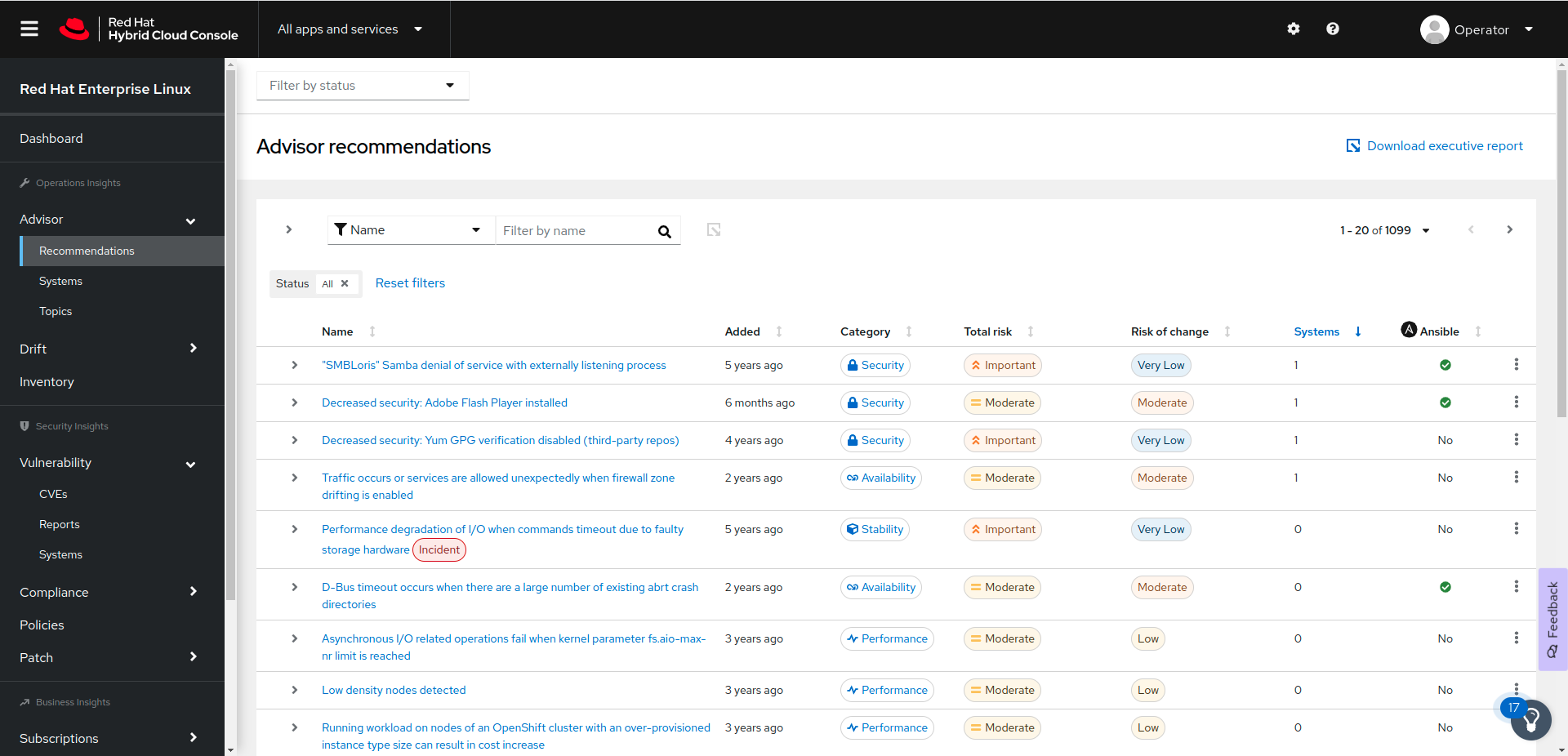
For each issue, Red Hat Insights provides information to help you to understand the problem, prioritize work to address it, determine what mitigation or remediation is available, and automate resolution with an Ansible Playbook. Red Hat Insights also provides links to Knowledgebase articles on the Customer Portal.
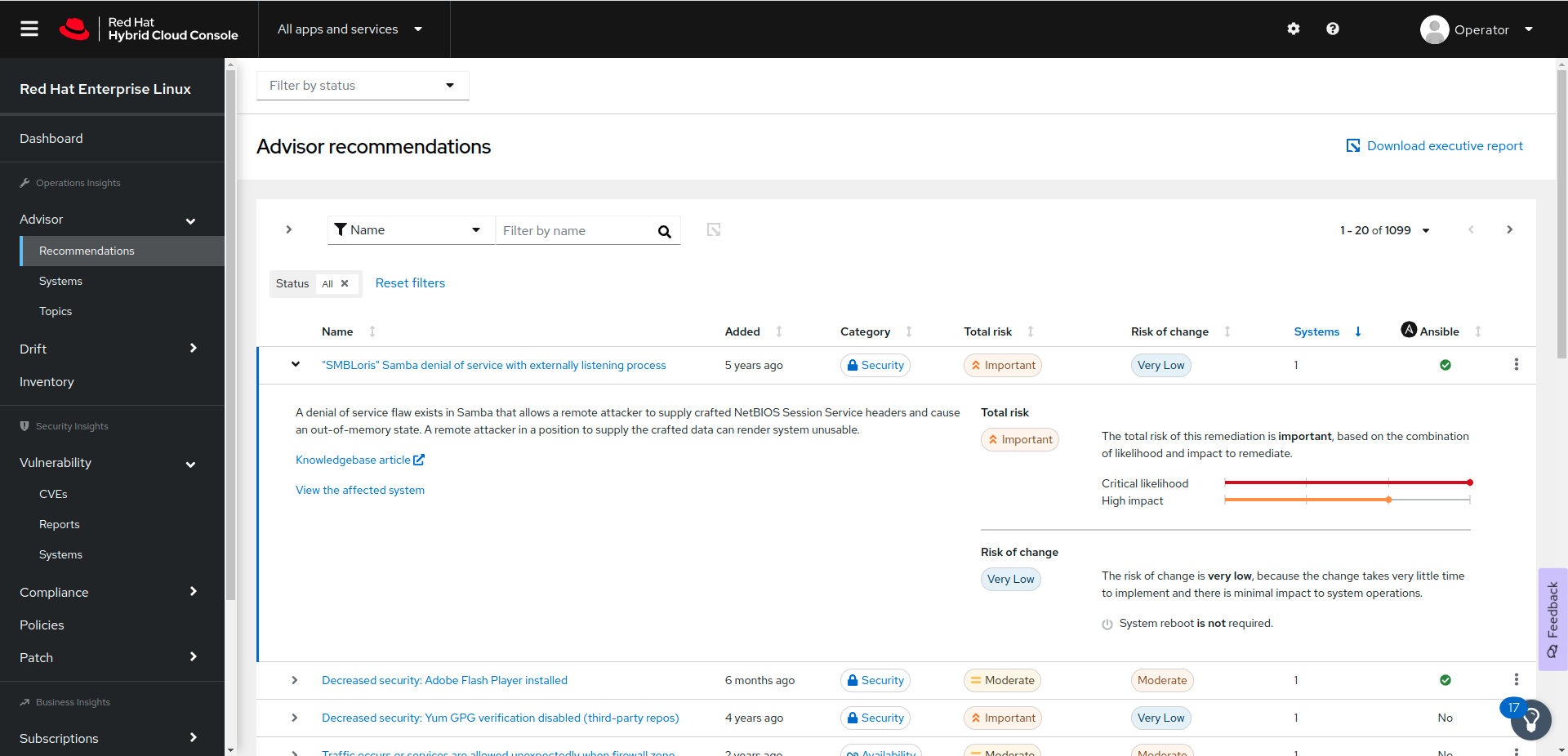
The Advisor service evaluates in two categories the risk that an issue presents to your system:
- Total risk
Indicates the impact of the issue on your system.
- Risk of change
Indicates the impact of the remediation action to your system. For example, you might need to restart the system.
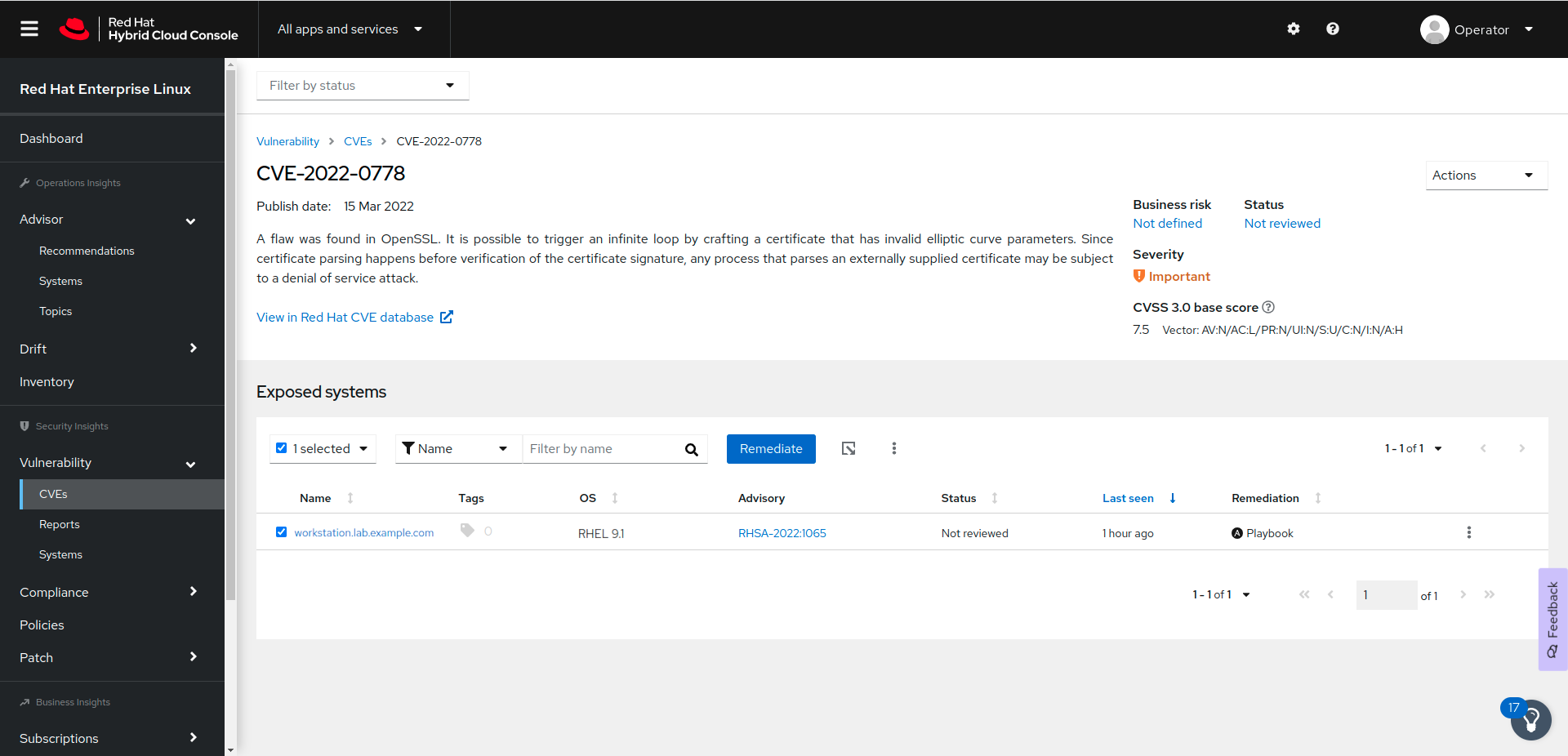
The Vulnerability service reports common vulnerabilities and exposures (CVEs) that impact your systems. You access the service from the → menu.
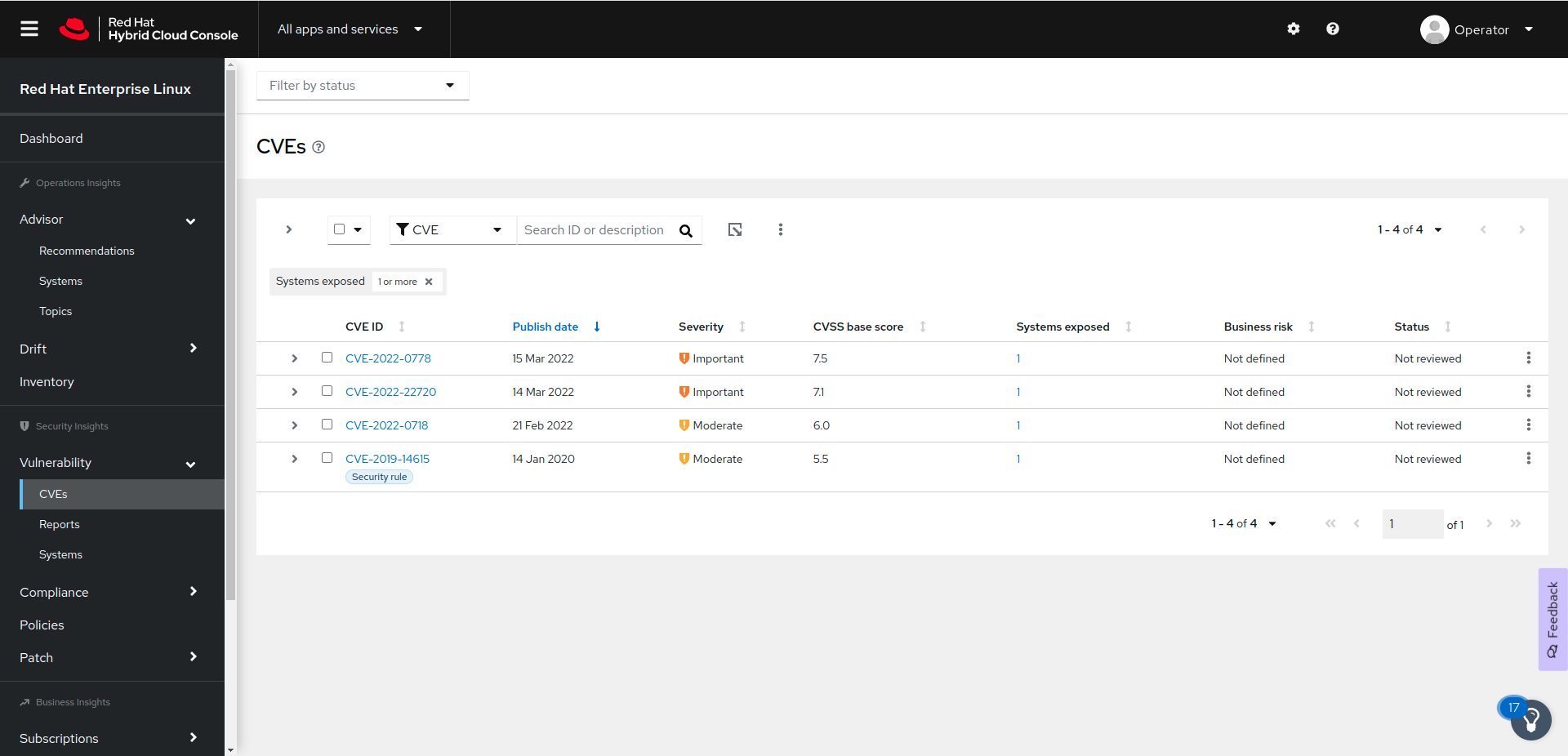
For each CVE, Insights provides additional information and lists the exposed systems. You can click the button to create an Ansible Playbook for remediation.
The Compliance service analyzes your systems and reports their compliance level to an OpenSCAP policy. The OpenSCAP project implements tools to verify the compliance of a system against a set of rules. Red Hat Insights provides the rules to evaluate your systems against different policies, such as the Payment Card Industry Data Security Standard (PCI DSS).
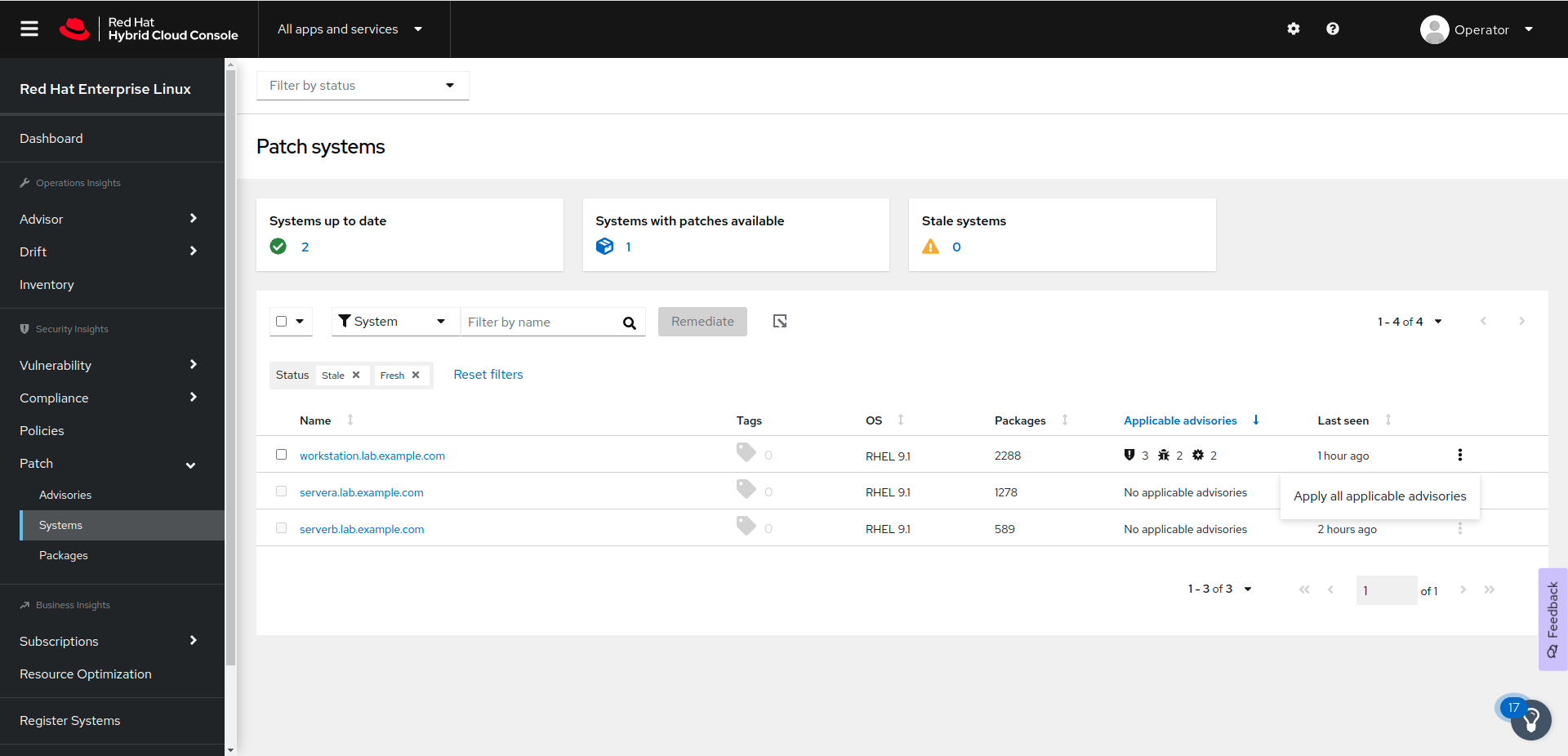
The Patch service lists the Red Hat Product Advisories that apply to your systems. It can also generate an Ansible Playbook, which you can run to update the relevant RPM packages for the applicable advisories. To access the list of advisories for a specific system, use the → menu. Click the button to generate the Ansible Playbook for a system.
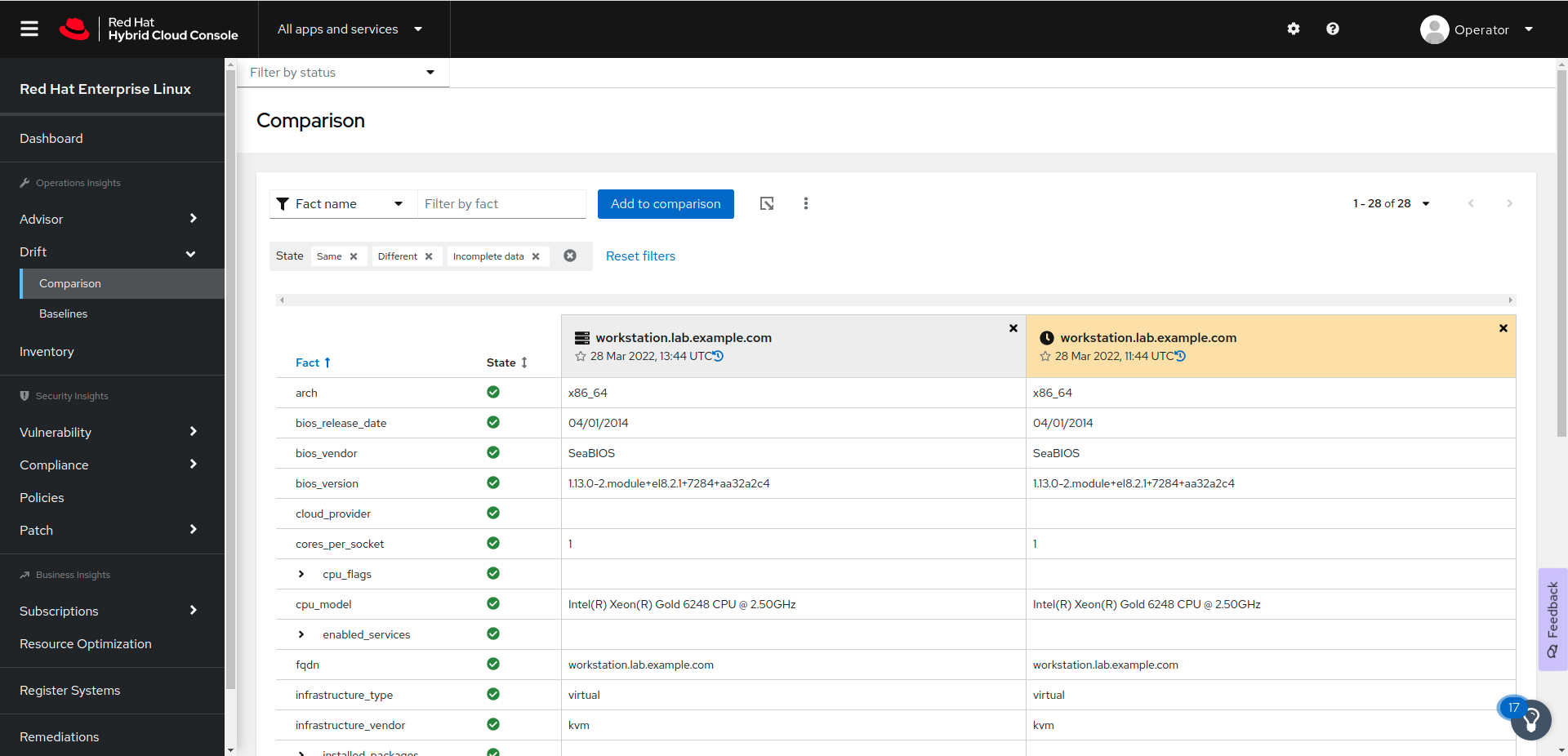
With the Drift service, you can compare systems, or obtain a system history. You can use this service for troubleshooting, by comparing a system to a similar system, or to a previous system state. You can access the service from the → menu.
The following figure shows that you can use Red Hat Insights to compare the same system at two different times:
By using the Policies service, you can create rules to monitor your systems and send alerts when a system does not comply with your rules. Red Hat Insights evaluates the rules every time that a system synchronizes its metadata. You can access the Policies service from the menu.

The page provides a list of the systems that you registered with Red Hat Insights. The column displays the time of the most recent metadata update for each system. By clicking a system name, you can review its details and directly access the Advisor, Vulnerability, Compliance, and Patch services for that system.
The page lists all the Ansible Playbooks that you created for remediation. You can download the playbooks from that page.
By using the page, you can monitor your Red Hat subscription usage.
References
insights-client(8) and insights-client.conf(5) man pages
For more information about Red Hat Insights, refer to the Product Documentation for Red Hat Insights at https://access.redhat.com/documentation/en-us/red_hat_insights
For more information about excluding data that Insights collects, refer to the Red Hat Insights Client Data Obfuscation and Red Hat Insights Client Data Redaction chapters in the Client Configuration Guide for Red Hat Insights at https://access.redhat.com/documentation/en-us/red_hat_insights/2021/html-single/client_configuration_guide_for_red_hat_insights/assembly-main-client-cg
Information about the data that Red Hat Insights collects is available at System Information Collected by Red Hat Insights