Red Hat Enterprise Linux Diagnostics and Troubleshooting
When a system starts up, many systemd services automatically start based on the selected boot configuration. Each of these services might depend on other services, units, or targets.
A systemd unit's configuration lists its dependencies, typically a drop-in file under /etc/systemd/system/, or by using a <UNITNAME>.d/requires or wants subdirectory, such as /etc/systemd/system/ or <UNITNAME>.requires/etc/systemd/system/, for drop-in file configuration.<UNITNAME>.wants
The following list describes the common types of unit dependency directives. For more detailed information, consult the systemd.unit(5) man page.
-
Requires= Starting this unit automatically pulls the listed required units into the transaction. Stopping a required unit causes this unit to stop. Unless
After=orBefore=relationships are used, units are all started at the same time. You can configure this dependency type by creating symbolic links to the required units in/etc/systemd/system/.<UNITNAME>.requires/-
Requisite= Similar to
Requiresbut stronger. While aRequiresstarts a required unit if it is not already running, aRequisitefails if the required unit is not running.-
Wants= Similar to
Requiresbut weaker. When a wanted unit fails to start, this unit still starts without it. You can configure this dependency type by creating symbolic links to the wanted units in/etc/systemd/system/.<UNITNAME>.wants/-
Conflicts= A negative dependency. Starting this unit stops the conflicting units, if possible.
-
Before=,After= These dependency types control ordering. Without these dependencies, required units are started at the same time. If the
a.serviceunit has theBefore=b.servicedependency, thenb.servicestartup is delayed until starting of thea.serviceis completed.After=indicates that starting of the listed units must complete before this unit can be started.
You can view a unit's dependencies manually, automatically, or graphically. To manually view a unit's dependencies, use the systemctl show command. An administrator can view the unit's configuration, and repeat this process for each listed dependency.UNIT
The automated method uses the systemctl list-dependencies command, which displays a recursive dependency tree. On a color-capable terminal, each line displays a green or red dot, to indicate whether that unit is currently active.UNIT
[root@demo ~]# systemctl list-dependencies nfs-server.service
nfs-server.service
● ├─auth-rpcgss-module.service
● ├─nfs-idmapd.service
● ├─nfs-mountd.service
● ├─nfsdcld.service
● ├─proc-fs-nfsd.mount
● ├─rpc-statd-notify.service
● ├─rpc-statd.service
● ├─rpcbind.socket
● ├─system.slice
● ├─network-online.target
● │ └─NetworkManager-wait-online.service
● └─network.target
Note
Many systemd units depend on starting after reaching a target, such as basic.target, which is a configuration of a group of units that are used as a synchronization point in the startup process. Running systemctl list-dependencies on a unit with a target dependency also lists all dependencies for the included targets.
When viewing units with large dependency chains, a graphical dependency representation might be easier to analyze. This method uses the systemd-analyze dot command with the dot rendering command from the graphviz package. The following example installs the tools, and then creates a graphical representation of the sshd.service unit's dependencies:
[root@demo ~]#yum install graphviz[root@demo ~]#systemd-analyze dot sshd.service | dot -Tsvg > sshd-dependencies.svgColor legend: black = Requires dark blue = Requisites dark grey = Wants red = Conflicts green = After
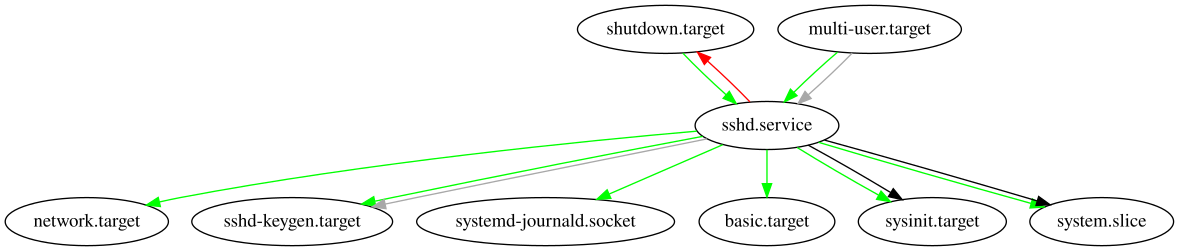
You can configure dependencies so that some services never start while adhering to those dependencies. For example, if the Requires and Before directives of two units are each set for the other unit, then startup would fail because neither unit would be able to satisfy both configurations. To maintain a system's ability to boot, systemd can detect these issues and attempt to resolve them. The method to resolve these issues is to remove one or more offending units from the transaction set until a non-conflicting configuration is reached. This can result in some expected services not starting. Failing services send output to the console, but reading the system logs is required to identify and resolve missing services in this scenario.
After identifying and verifying such issues, modify the affected unit dependencies to resolve the situation. In many cases, changing Requires to Wants, or editing a circular use of Before or After, can resolve the situation.
Important
You must inform systemd of your static configuration file edits by running systemctl daemon-reload to implement your changes on the active system.
Sometimes, startup tasks take much longer than expected, or fail to complete after minutes or hours. The systemctl list-jobs command displays all jobs that systemd is currently executing. An administrator can stop or kill selected jobs, or resolve and repair the root cause for these job delays.
For privileged access to the system before startup completes, you can enable the debug-shell service, which provides a root shell during startup. This service starts a virtual console with a logged-in root shell that is attached to it on /dev/tty9, during the early sysinit.target startup. An administrator can use this early root shell to analyze, debug, and possibly resolve a failing service or unit.
Warning
Do NOT leave the debug-shell service enabled and running after your authorized troubleshooting is completed. Any user with console access, whether physical or via a management card or KVM switch, can use the service to obtain unrestricted root access to the system.


