Red Hat Enterprise Linux Diagnostics and Troubleshooting
Describe configuration management with Red Hat Satellite and Red Hat Ansible Automation Platform.
As an organization's IT infrastructure grows, system configuration becomes unmanageable when still performed manually. Manual system administration fails to scale, introduces increased human errors, and might negatively impact system stability and function.
A recommended alternative is to use a configuration management solution. Configuration management tools can greatly enhance operational stability and efficiency, and expedite the deployment of configuration changes to many systems. Because changes are automated and programmatic, the accuracy of those changes is ensured.
Red Hat Satellite is a system management solution that deploys, configures, and maintains systems across physical, virtual, and cloud environments. Red Hat Satellite provides provisioning, remote management, and monitoring of multiple Red Hat Enterprise Linux deployments with a centralized tool. A Satellite Server organizes lifecycle management by using organizations as principal division units. Organizations isolate content for groups of hosts with specific requirements and administration tasks.
Organizations with broad configuration management requirements might also find Red Hat Ansible Automation Platform suitable. Ansible Automation Platform is a simple automation language that can describe a general IT infrastructure by using playbook tasks. Ansible Automation Platform is based on Python, is agentless, and relies on SSH connections to push configurations to designated remote systems.
Ansible Automation Platform includes an automation controller (formerly known as Red Hat Ansible Tower), which adds a dashboard and graphical tools to the solution. The automation controller can integrate server inventory from Red Hat Satellite, and can host and provide configuration roles and playbooks for Red Hat Satellite to launch.
System administrators can use Ansible Automation Platform to implement Infrastructure as Code by using a descriptive language to configure systems, instead of using individual, customized tasks. Ansible Automation Platform uses YAML syntax as its playbook language, which makes playbooks simple to read and write.
Playbooks can manage remote system configuration and deployment. Playbooks can also sequence multi-tier rollouts that involve rolling updates; can delegate actions to other hosts; and can interact with multiple host types while running tasks. Playbooks not only manage configurations, but can also orchestrate any ordered process, even when process steps execute and communicate on and between multiple hosts.
Because Ansible Automation Platform is agentless, the only requirement for communication between hosts is to connect via SSH with user accounts with sufficient permissions for the requested tasks.
The following nodes are defined for configuration management processes:
- Control node
A host where Ansible Automation Platform is installed, from which playbooks are launched to execute tasks.
- Managed node
Hosts that are reachable by the control node, where the launched tasks are running.

The control node stores the configuration files:
ansible.cfg. Ansible Automation Platform configuration file.Inventory. A list of managed nodes.
Playbooks, modules, or roles. Units or sets of defined configuration tasks.
Ansible Playbooks retrieve or discover variables, called facts, which contain information from the managed system, and that influence some behavior or state change on the system. For example, the discovered IP address from one system can be used as a service configuration value in another system.
Run this example ad hoc command to verify the available variables on server.example.com:
[user@host ~]$ ansible server -m ansible.builtin.setupNote
To reach managed nodes, the control node must know the hostname, short name, or IP address of each node. In the control node inventory, aliases can be also used for identification and for grouping managed hosts.
Facts are variable data that are stored in memory by default. Ansible Automation Platform uses a memory cache plug-in to maintain facts in memory for the duration of the current playbook run.
The Jinja2 templating system uses the facts as substitution variables in configuration files. Jinja2 templating enables dynamic expressions and access to variables, as in this example:
- name: Template example configuration file
  template:
    source: file.cfg.j2
    dest: {{ remote_install_path }}/file.cfg
The remote_install_path variable defines a file location, which might vary from one system to another.
A playbook can disable fact gathering, with this syntax:
- hosts: servers
  gather_facts: no
RHEL System Roles is a collection of Ansible Roles and modules to manage system configurations across multiple versions of RHEL. Because roles are consistent, they are useful for troubleshooting by creating a known-good configuration for comparison. Roles can be used to test problem cause hypotheses, or to eliminate common configuration problems that cause other service failures. For example, improper time synchronization is a common root cause for network application failure in secure environments.
Red Hat Enterprise Linux 8 includes these roles by default:
- certificate
Manages TLS/SSL certificate issuance and renewal.
- crypto_policies
Manages system-wide crypto security policies.
- ha_cluster
Manages High Availability (Corosync) Clustering.
- kdump
Replaces the
kdumpconfiguration of the managed host.- kernel_settings
Modifies kernel settings, with
tuned.- logging
Provisions and configures the logging system, with
rsyslog.- metrics
Configures performance analysis services for the managed host.
- nbde_client, nbde_server
Configures Network-Bound Disk Encryption clients with
clevis, and Network-Bound Disk Encryption servers withtang.- network
Configures the network on target machines. Non-privileged users can use the role to configure different types of interfaces, such as:
Ethernet
Bridge
Bond
VLAN
MacVLAN
InfiniBand
Wireless (WiFi)
Non-privileged users can also use the role for other network configurations, such as:
IP address
802.1x authentication
- postfix
Provides
postfix.confPostfix configuration dictionary with key/value parameters.- selinux
Manages local customization:
Set enforcing modes
Manage and restore file contexts
Manage Booleans, logins, and ports
- ssh, sshd
Manages SSH client configuration and configures the OpenSSH server daemon.
- storage
Configures local storage with minimal input. Non-privileged users can use this role to manage file systems and mount entries from different types of devices, such as:
Unpartitioned disks
lvm (unpartitioned whole-disk physical volumes only)
- timesync
Manages an NTP or PTP implementation to operate as an NTP or PTP client for system clock synchronization.
- tlog
Configures a system for Terminal session recording, by configuring
tlogto log recording data to thesystemdjournal.
To use RHEL System Roles, verify that the rhel-system-roles package, which is available from the AppStream repository, is installed on the controller node:
[root@host ~]# yum install rhel-system-rolesTo implement an Ansible Role, include a roles task in an Ansible Playbook:
- hosts: servers
  roles:
     - rhel-system-roles.network
     - rhel-system-roles.timesync
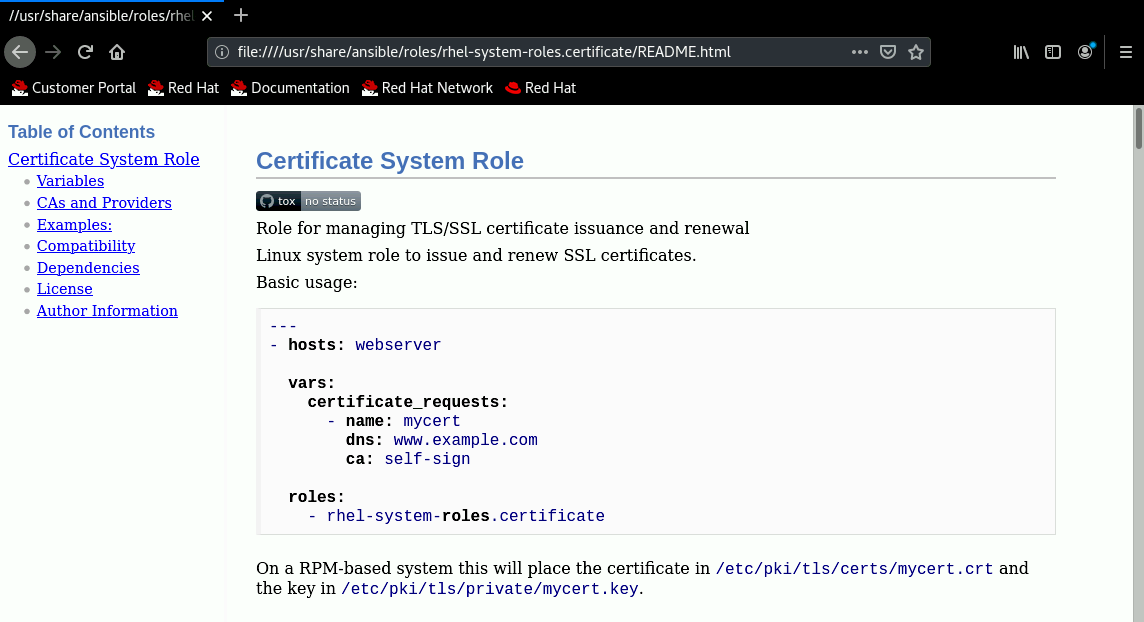
On the control node, Ansible Roles are hosted in the /usr/share/ansible/roles directory, with a directory for each role with all the information and requirements to use the role. Every role includes Markdown and HTML documentation files. Some roles include use case templates and examples, such as for the certificate role:
[user@host ~]#tree /usr/share/ansible/roles/linux-system-roles.certificate/usr/share/ansible/roles/linux-system-roles.certificate ├── ansible_pytest_extra_requirements.txt ├── custom_requirements.txt ├── defaults │ └── main.yml ├──examples│ ├── basic_self_signed.yml │ ├── dns_ip_and_email.yml │ ├── key_usage_and_extended_key_usage.yml │ ├── many_self_signed.yml │ ├── no_auto_renew.yml │ ├── not_wait_for_certificate.yml │ ├── owner_and_group.yml │ ├── principal.yml │ ├── subject.yml │ └── wrong_provider.yml ├── library │ └── certificate_request.py ├── LICENSE ├── meta │ └── main.yml ├── module_utils │ └── certificate_lsr │ ├──init.py │ └── providers │ ├── base.py │ ├── certmonger.py │ └──init.py ├──README.html├── README.md ...output omitted...
The README file describes the role's use cases, parameters, templates, example syntax, and structure. To view the HTML version, use your browser to open the file from the command line:
[user@host ~]#cd /usr/share/ansible/roles[user@host roles]#firefox linux-system-roles.certificate/README.html
References
For further information, refer to the Red Hat Satellite product page at https://access.redhat.com/products/red-hat-satellite/#knowledge
For further information, refer to Configuring Satellite to Use Ansible at https://access.redhat.com/documentation/en-us/red_hat_satellite/6.9/html-single/configuring_satellite_to_use_ansible/index
For further information, refer to the Working With Playbooks section in Ansible Documentation at https://docs.ansible.com/ansible/2.9/user_guide/playbooks.html
For further information, refer to the Introduction to RHEL System Roles chapter in the Automating System Administration by Using RHEL System Roles guide at https://access.redhat.com/documentation/en-us/red_hat_enterprise_linux/8/html-single/automating_system_administration_by_using_rhel_system_roles/index


