RHCSA Rapid Track
Prepare and build virtualization infrastructure using Red Hat Enterprise Linux.
Objectives
After completing this section, students should be able to:
Describe and contrast Red Hat virtualization platforms.
Install Red Hat Enterprise Linux as a virtualization host system.
System virtualization and Red Hat Enterprise Linux
KVM (Kernel-based Virtual Machine) is a full virtualization solution built into the standard Red Hat Enterprise Linux kernel. It can run multiple, unmodified Windows and Linux guest operating systems. The KVM hypervisor in Red Hat Enterprise Linux is managed with the libvirt API and utilities, such as virt-manager and virsh. Since Red Hat Enterprise Linux is the foundation of Red Hat Enterprise Virtualization and the Red Hat OpenStack platform, KVM is a consistent component across products of the Red Hat cloud infrastructure.
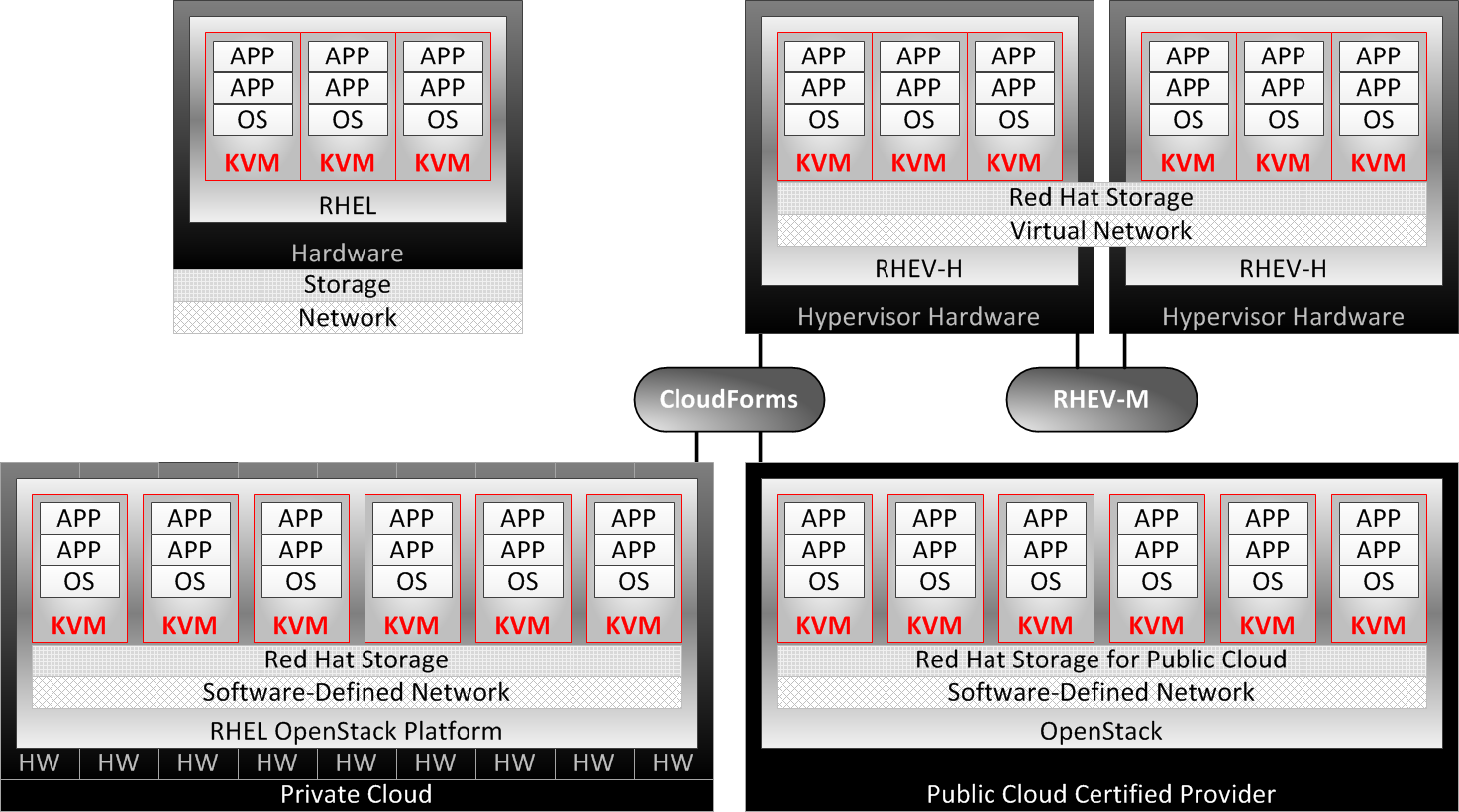
KVM provides the virtual machine (VM) technology across all Red Hat products, from standalone physical instances of Red Hat Enterprise Linux up to the cloud OpenStack platform. Starting at the upper-left corner of the previous figure:
Physical (legacy) systems—Red Hat Enterprise Linux installations on legacy hardware provide KVM virtualization, up to the physical limitations of single systems, and are managed by libvirt utilities such as virt-manager. Red Hat Enterprise Linux instances may also be directly hosted at Red Hat Certified Cloud Providers through Red Hat Cloud Access.
Red Hat Enterprise Linux is typically configured as a thick host, a system that supports VMs while also providing other local and network services, applications, and management functions.
Red Hat Enterprise Virtualization (RHEV)—supports KVM instances across multiple Red Hat Enterprise Virtualization hypervisor (RHEV-H) systems, providing KVM migration, redundancy, and high availability managed by RHEV Manager (RHEV-M).
Red Hat Enterprise Virtualization Hypervisor is a thin host, an expertly minimized and tuned version of Red Hat Enterprise Linux dedicated to the singular purpose of provisioning and supporting guest VMs.
RHEL OpenStack platform—Red Hat private cloud architecture using integrated and tuned OpenStack on a Red Hat Enterprise Linux foundation with KVM, managed by either the Red Hat OpenStack Dashboard (Horizon component) or by Red Hat CloudForms.
OpenStack in public cloud—OpenStack public cloud architecture implemented at Red Hat Certified Cloud Providers, and managed by either the OpenStack Horizon component or by Red Hat CloudForms.
Hybrid Cloud—Red Hat CloudForms cloud management utilities manage and migrate KVM instances across Red Hat RHEV and OpenStack architectures, and transition KVM instances with third-party OpenStack and VMware platforms.
KVM instance configurations are compatible across Red Hat products. Installation requirements, parameters, and procedures are equivalent on supported platforms.
Configure a Red Hat Enterprise Linux Physical System as a Virtualization Host
Red Hat Enterprise Linux can be configured as a virtualization host, appropriate for development, testing, training, or when needing to work in multiple operating systems at the same time. Red Hat Enterprise Linux hosts provide the ability to install additional software on the host platform as needed, such as monitoring utilities and agents, network services, specialized storage, and/or other development tools that may not be appropriate to install on dedicated Red Hat Enterprise Virtualization hypervisors.
Red Hat Enterprise Linux installations also provide easier access to tuning and resource management tools (e.g., tuned and cgroups). By comparison, RHEV-H hypervisors are highly secured and self-tuned, restricting system administrator-initiated customization by design. When greater administrative control is required and the performance compromise is acceptable, Red Hat Enterprise Linux is a flexible standalone KVM platform. KVM instances built on RHEL can be migrated or transitioned to more appropriate KVM platforms as enterprise needs increase.
Preparing a Red Hat Enterprise Linux system to become a virtualization host requires checking for minimal system requirements and installing a choice of virtualization host packages.
Recommended system requirements:
One processor core or hyperthread for the maximum number of virtualized CPUs in a guest virtual machine and one for the host.
2GB of RAM, plus additional RAM for virtual machines.
6GB disk space for the host, plus the required disk space for each virtual machine. Most guest operating systems require at least 6GB of disk space, but actual storage space requirements depend on each guest's image format.
The KVM hypervisor requires either an Intel processor with the Intel VT-x
and Intel 64 extensions for x86-based systems, or an AMD processor with the
AMD-V and the AMD64 extensions. To verify that the host system hardware
supports the correct extensions, view /proc/cpuinfo.
[root@serverX ~]#grep --color -E "vmx|svm" /proc/cpuinfoflags : fpu vme de pse tsc msr pae mce cx8 apic sep mtrr pge mca cmov pat pse36 clflush dts acpi mmx fxsr sse sse2 ss ht tm pbe syscall nx lm constant_tsc arch_perfmon pebs bts rep_good aperfmperf pni dtes64 monitor ds_cpl vmx smx est tm2 ssse3 cx16 xtpr pdcm sse4_1 xsave lahf_lm dts tpr_shadow vnmi flexpriority
The No eXecute (NX) feature, called eXecute Disable (XD) by Intel and Enhanced Virus Protection by AMD, is not necessary for building a host on Red Hat Enterprise Linux, but is required for a Red Hat Enterprise Virtualization hypervisor (RHEV-H).
[root@serverX ~]#grep --color -E "nx" /proc/cpuinfoflags : fpu vme de pse tsc msr pae mce cx8 apic sep mtrr pge mca cmov pat pse36 clflush dts acpi mmx fxsr sse sse2 ss ht tm pbe syscall nx lm constant_tsc arch_perfmon pebs bts rep_good aperfmperf pni dtes64 monitor ds_cpl vmx smx est tm2 ssse3 cx16 xtpr pdcm sse4_1 xsave lahf_lm dts tpr_shadow vnmi flexpriority
Building a RHEL virtualization host requires the
qemu-kvm and qemu-img packages at a minimum,
to provide the user-level KVM emulator and disk image manager.
[root@serverX ~]#yum install qemu-kvm qemu-img
Additional virtualization management packages are also recommended:
python-virtinst—Provides the virt-install command for creating virtual machines.
libvirt—Provides the host and server libraries for interacting with hypervisors and host systems.
libvirt-python—Contains a module to permit Python applications to use the libvirt API.
virt-manager—Provides the Virtual Machine Manager graphical tool for administering VMs, using the libvirt-client library as the management API.
libvirt-client—Provides the client APIs and libraries for accessing libvirt servers, including the virsh command-line tool to manage and control VMs.
[root@serverX ~]#yum install virt-manager libvirt libvirt-python python-virtinst libvirt-client
The updated anaconda graphical installation program for Red Hat Enterprise Linux 7 provides better support for installing RHEL to meet specific purposes. An anaconda install no longer provides the ability to select individual RPM packages—only base environments and add-ons appropriate for the selected base—thus eliminating guesswork and resulting in leaner configurations. System administrators may still install any other desired RPM packages after an installation is complete by using standard RPM installation tools (e.g., yum or GNOME PackageKit).
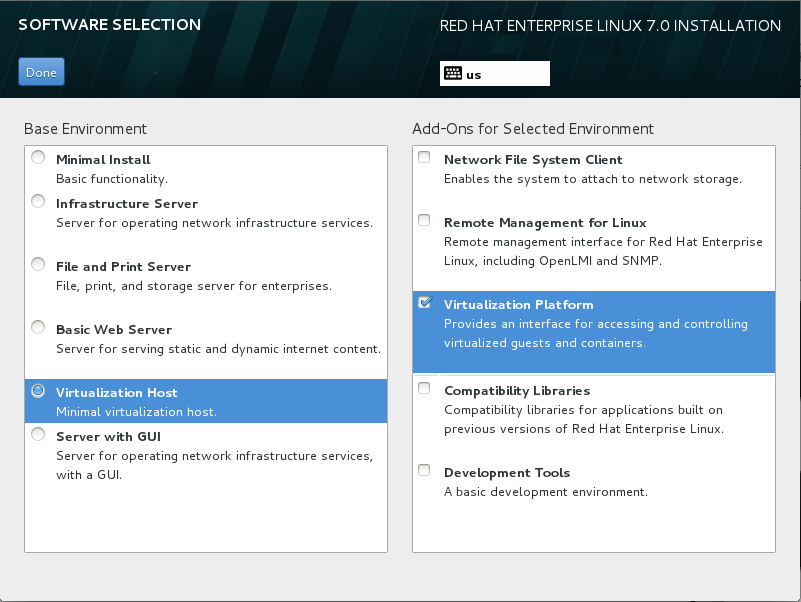
To build a virtualization host during a graphical install of Red Hat Enterprise Linux, choose the base environment Virtualization Host in the left pane of the anaconda Software Selection screen. Select the Virtualization Platform Add-On checkbox in the right pane to include the management tools and utilities, as shown in the following figure.
Managing virtual machines
The libvirt package is a hypervisor-independent virtualization API to securely manage virtual machines by providing the ability to provision, create, modify, monitor, control, migrate, and stop virtual machines on a single host. The libvirt package provides APIs to enumerate, monitor, and use the resources available on the managed host, including CPUs, memory, storage, and networking. Management tools utilizing libvirt can access host systems remotely using secure protocols.
Red Hat Enterprise Linux uses libvirt-based tools as the default for virtualization management. Support is included for the RHEL 5 Xen hypervisor, and for KVM on RHEL 5, 6, and 7. These management tools utilize libvirt:
virsh—The virsh command-line tool is an alternative to the graphical virt-manager application. Unprivileged users can use virsh in read-only mode, or with root access for full administrative functionality. The virsh command is ideal for scripting virtualization administration.
virt-manager—virt-manager is a graphical desktop tool allowing access to guest consoles, and is used to perform virtual machine creation, migration, configuration, and administrative tasks. Both local and remote hypervisors can be managed through a single interface.
RHEV-M—Red Hat Enterprise Virtualization Manager provides a central management platform for physical and virtual resources, allowing virtual machines to be started, stopped, built, and migrated between hosts. RHEV-M also manages the storage and network components of a data center and provides secure, remote graphical guest console access.
Start the Virtual Machine Manager from the menu at → → , or by running the virt-manager command from the shell. Use this interface to power on or power off virtual machines, assign memory and CPU resources, monitor performance, and connect to the console of the virtual machines.
The virsh command-line tool provides the same functionality as virt-manager. Use virsh as an interactive shell to perform subcommands such as edit, list, start, stop, and destroy. The following examples show the virsh commands run as standalone commands from the shell:
[root@foundationX ~]#virsh listId Name State ---------------------------------- 1 desktop running 2 server running[root@foundationX ~]#virsh destroy server[root@foundationX ~]#virsh list --allId Name State ---------------------------------- 1 desktop running - server shut off[root@foundationX ~]#virsh start server[root@foundationX ~]#virsh listId Name State ---------------------------------- 1 desktop running 2 server running
virsh has subcommands for additional management tasks:
connect—Connect to a local or remote KVM host using
qemu:///syntax.hostnodeinfo—Returns basic information about the host, including CPUs and memory.
autostart—Configures a KVM domain to start when the host boots.
console—Connect to the virtual serial console of a guest.
create—Create a domain from an XML configuration file and start it.
define—Create a domain from an XML configuration file, but do not start it.
undefine—Undefine a domain. If the domain is inactive, the domain configuration is removed.
edit—Edit the XML configuration file for a domain, which will affect the next boot of the guest.
reboot—Reboot the domain, as if the reboot command had been run from inside the guest.
shutdown—Gracefully shuts down the domain, as if the shutdown command had been run from inside the guest.
screenshot—Takes a screenshot of a current domain console and stores it in a file.
References
Additional information may be available in the introduction and chapter on system requirements in the Red Hat Enterprise Linux Virtualization Deployment and Administration Guide for Red Hat Enterprise Linux 7, which can be found at https://access.redhat.com/documentation/
Red Hat Enterprise Virtualization Administration Guide
Section 1. Basics
Red Hat Enterprise Linux OpenStack Platform 4 Getting Started Guide
Section 1. Introduction
virsh(1), virt-manager(1) man pages