RHCSA Rapid Track
The system-config-kickstart utility can be used to create a Kickstart configuration file.
Another way to create a Kickstart configuration file is to use a text editor and the ksvalidator command to check for syntax errors.
The ks=
ksfile-locationoption to the Anaconda kernel specifies where to find the Kickstart configuration file.
Objectives
After completing this section, students should be able to:
Create a Kickstart configuration file with the system-config-kickstart utility.
Modify an existing Kickstart configuration file with a text editor and check its syntax with ksvalidator.
Publish a Kickstart configuration file to the installer.
Perform a network Kickstart installation.
Kickstart installation steps
An ordered process is required to automate the successful installation of Red Hat Enterprise Linux.
Three steps must be taken to perform a Kickstart installation:
Create a Kickstart configuration file.
Publish the Kickstart configuration file to the installer.
Boot Anaconda and point it to the Kickstart configuration file.
Creating a Kickstart configuration file
There are two ways to create a Kickstart configuration file:
Use the system-config-kickstart utility.
Use a text editor.
The system-config-kickstart utility presents a number of graphical dialog boxes, takes inputs from the user, then creates a text file with Kickstart directives that correspond to the user's choices. Each dialog box corresponds to a category of questions asked by the Red Hat installer, Anaconda. Optionally, an existing configuration file can be passed as an argument and system-config-kickstart will use it to populate values for configuration options. system-config-kickstart is provided by the system-config-kickstart package.
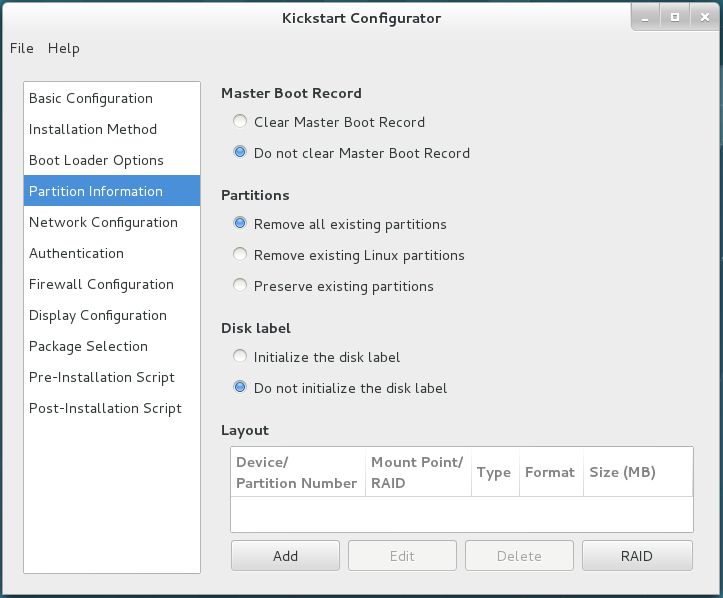
Creating a Kickstart configuration file from scratch with a
text editor is rare. The Anaconda installer creates a file called
/root/anaconda-ks.cfg that contains the Kickstart
directives that can be used to generate the freshly installed system.
This file makes a good starting point when creating a Kickstart
configuration file with a text editor.
The following are some reasons for creating a Kickstart file manually instead of using system-config-kickstart:
The GUI and/or system-config-kickstart is unavailable.
Advanced disk partition configuration instructions are needed. system-config-kickstart does not support LVM and software RAID.
Individual packages need to be included or omitted (not just groups).
More advanced scripting is needed in the
%preand%postsections.
ksvalidator is a utility that checks
for syntax errors in a Kickstart configuration file. It will
ensure keywords and options are properly used, but it will not
validate URL paths, individual packages, or groups, nor any part
of %post or %pre scripts. For instance,
if the firewall --disabled directive is misspelled,
ksvalidator could produce one of the following
errors:
[student@desktopX]$ksvalidator /tmp/anaconda-ks.cfgThe following problem occurred on line 10 of the kickstart file: Unknown command: frewall[student@desktopX]$ksvalidator /tmp/anaconda-ks.cfgThe following problem occurred on line 10 of the kickstart file: no such option: --dsabled
The pykickstart RPM provides ksvalidator.
Publish the Kickstart configuration file to Anaconda
Make the Kickstart configuration file available to the installer:
Network servers: FTP, HTTP, NFS
DHCP/TFTP server
USB disk or CD-ROM
Local hard disk
The installer must be able to access the Kickstart file to begin an automated installation. Although there are several methods to make the Kickstart configuration file available, the most common is through a network server such as an FTP server, a web server, or an NFS server. Network servers facilitate Kickstart file maintenance because changes only need to be made once and take effect immediately.
Providing Kickstart files on USB or CD-ROM is another convenient way to publish configuration files. The Kickstart configuration file is embedded on the boot media used to start the installation. When changes are made, new installation media must be generated.
It is possible to provide the Kickstart file on a local disk. This allows a quick way to rebuild a development server.
Boot Anaconda and point it to the Kickstart configuration file
Once a Kickstart method is chosen, the installer must be told
where the Kickstart file is located. This is done by passing a
ks=LOCATION argument
to the installation kernel. The following are some sample specifications:
ks=http://
server/dir/fileks=ftp://
server/dir/fileks=nfs:
server:/dir/fileks=hd:
device:/dir/fileks=cdrom:/
dir/file
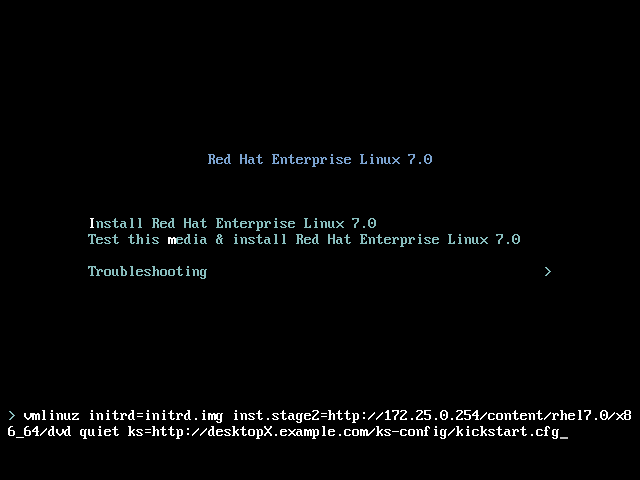
For virtual machine installations using the Virtual Machine
Manager or virt-manager, the Kickstart
URL can be specified in a box under URL Options.
When installing physical machines, boot using installation media and
press the Tab key to interrupt the boot process.
Enter one of the ks= entries above as a parameter to
the installation kernel.
Note
The package selection feature of the system-config-kickstart utility is currently disabled due to the following bug (https://bugzilla.redhat.com/show_bug.cgi?id=1272068).
References
ksvalidator(1) and system-config-kickstart(8) man pages