RHCSA Rapid Track
Abstract
| Goal | To copy, move, create, delete, link and organize files while working from the Bash shell prompt. |
| Objectives |
|
| Sections |
|
Identify the purpose for top-level directories in the Linux hierarchy.
Objectives
After completing this section, students should be able to understand fundamental file system layout, organization, and the location of key file types.
The file system hierarchy
All files on a Linux system are stored on file systems which are organized into a single inverted tree of directories, known as a file system hierarchy. This tree is inverted because the root of the tree is said to be at the top of the hierarchy, and the branches of directories and subdirectories stretch below the root.
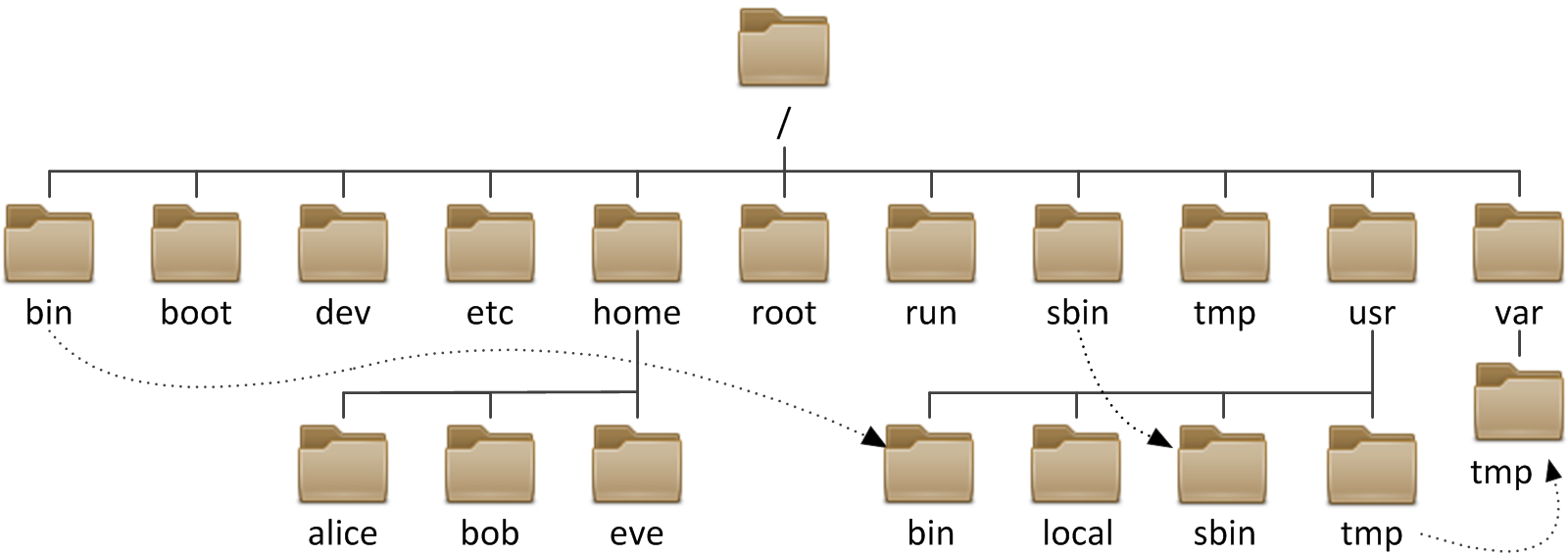
The directory / is the root directory at the top of the
file system hierarchy. The / character is also used as
a directory separator in file names. For example, if
etc is a subdirectory of the /
directory, we could call that directory /etc.
Likewise, if the /etc directory contained a file named issue, we could refer
to that file as /etc/issue.
Subdirectories of / are used for standardized purposes to organize files by
type and purpose. This makes it easier to find files. For example, in the
root directory, the subdirectory /boot is used for storing files needed to
boot the system.
Note
The following terms are encountered in describing file system directory contents:
| - static is content that remains unchanged until explicitly edited or reconfigured. |
| - dynamic or variable is content typically modified or appended by active processes. |
| - persistent is content, particularly configuration settings, that remain after a reboot. |
| - runtime is process- or system-specific content or attributes cleared during reboot. |
The following table lists some of the most important directories on the system by name and purpose.
Table 2.1. Important Red Hat Enterprise Linux directories
| Location | Purpose | |||
|---|---|---|---|---|
/usr
|
Installed software, shared libraries, include files, and static
read-only program data. Important subdirectories include:
| |||
/etc
| Configuration files specific to this system. | |||
/var
|
Variable data specific to this system that should persist between boots.
Files that dynamically change (e.g. databases, cache directories, log files,
printer-spooled documents, and website content) may be found
under /var.
| |||
/run
|
Runtime data for processes started since the last boot. This includes
process ID files and lock files, among other things. The contents of
this directory are recreated on reboot. (This directory consolidates
/var/run and /var/lock from
older versions of Red Hat Enterprise Linux.)
| |||
/home
| Home directories where regular users store their personal data and configuration files. | |||
/root
| Home directory for the administrative superuser, root. | |||
/tmp
|
A world-writable space for temporary files. Files which have not
been accessed, changed, or modified for 10 days are deleted from
this directory automatically.
Another temporary directory exists, /var/tmp,
in which files that have not been accessed, changed, or modified
in more than 30 days are deleted automatically.
| |||
/boot
| Files needed in order to start the boot process. | |||
/dev
| Contains special device files which are used by the system to access hardware. |
Important
In Red Hat Enterprise Linux 7, four older directories in / now have
identical contents as their counterparts located in /usr:
- /bin and /usr/bin.
|
- /sbin and /usr/sbin.
|
- /lib and /usr/lib.
|
- /lib64 and /usr/lib64.
|
In older versions of Red Hat Enterprise Linux, these were distinct directories containing
different sets of files. In RHEL 7, the directories in /
are symbolic links to the matching directories in /usr.