RHCSA Rapid Track
Course update
An updated version of this course is available that uses a newer version of Red Hat Enterprise Linux in the lab environment. Therefore, the RHEL 9.0 version of the lab environment will retire on December 31, 2024. Please complete any work in this lab environment before it is removed on December 31, 2024. For the most up-to-date version of this course, we recommend moving to the RHEL 9.3 version.
- SectionRegister Systems for Red Hat Support
- Quiz: Register Systems for Red Hat Support
- Install and Update Software Packages with DNF
- Guided Exercise: Install and Update Software Packages with DNF
- Enable DNF Software Repositories
- Guided Exercise: Enable DNF Software Repositories
- Lab: Install and Update Software Packages
- Summary
Abstract
| Goal | Download, install, update, and manage software packages from Red Hat and DNF package repositories. |
| Objectives |
|
| Sections |
|
| Lab |
|
Register a system to your Red Hat account and assign it entitlements for software updates and support services with Red Hat Subscription Management.
Red Hat Subscription Management provides tools to entitle machines to product subscriptions, for administrators to get updates to software packages and to track information about support contracts and subscriptions that the systems use.
Standard tools such as the dnf command obtain software packages and updates through a content distribution network that the Red Hat Content Delivery Network provides.
You can perform the following main tasks with the Red Hat Subscription Management tools:
Register a system to associate it with the Red Hat account with an active subscription. With the Subscription Manager, the system can register uniquely in the subscription service inventory. You can unregister the system when it is not in use.
Subscribe a system to entitle it to updates for the selected Red Hat products. Subscriptions have specific levels of support, expiration dates, and default repositories. The tools help to either auto-attach or select a specific entitlement.
Enable repositories to provide software packages. By default, each subscription enables multiple repositories; other repositories such as updates or source code are enabled or disabled. A repository is a central location for storing and maintaining software packages.
Review and track available or consumed entitlements. In the Red Hat Customer Portal, you might view the subscription information locally on a specific system or for a Red Hat account.
Simple Content Access (SCA) is a Red Hat subscription management capability. When you enable SCA for your organization, the entitlement process is simplified. SCA eliminates the requirement to attach subscriptions at a per-system level. You register your systems, enable the repositories that each system needs, and begin installing software packages.
Simple Content Access is an optional feature of Red Hat Satellite Server and Red Hat Subscription Management. This course includes the subscription commands, as needed, if you have not yet enabled SCA.
Different options exist to register a system with the Red Hat Customer Portal. For example, you can access a graphical interface by using a GNOME application or through the RHEL web console, or you can register your system by using a command-line tool.
To register a system by using a GNOME application, launch the Red Hat Subscription Manager application from the menu.
Type subscription in the field and click the application.
When prompted, enter the appropriate password to authenticate.
In the window, click to open the dialog box.
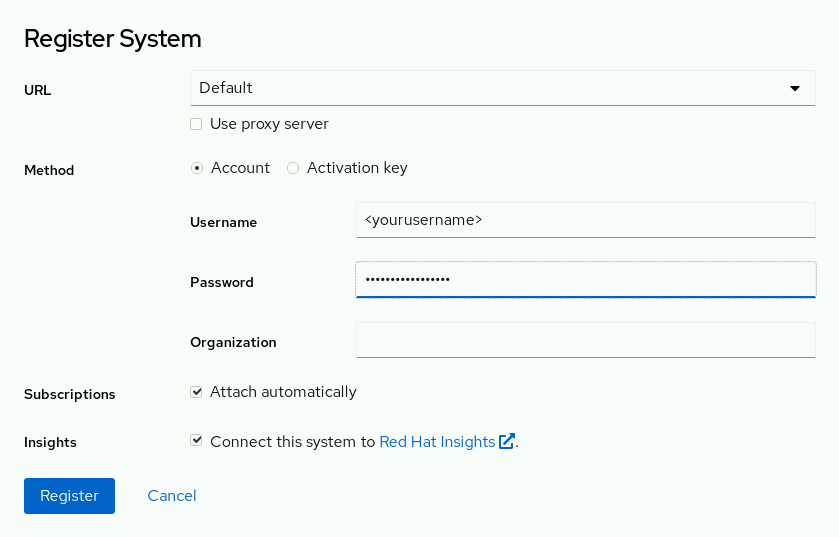 |
By default, systems register to the Red Hat Customer Portal. Provide the login and the password for your Red Hat Customer Portal account and click to register the system. When registered, the system automatically attaches an available subscription.
Close the window after registering and assigning the system to a subscription. The system is now subscribed and ready to receive updates or to install new software according to the subscription that is attached to the Red Hat Content Delivery Network.
To register a system with the web console, you must log in as a privileged user. Click and then click :
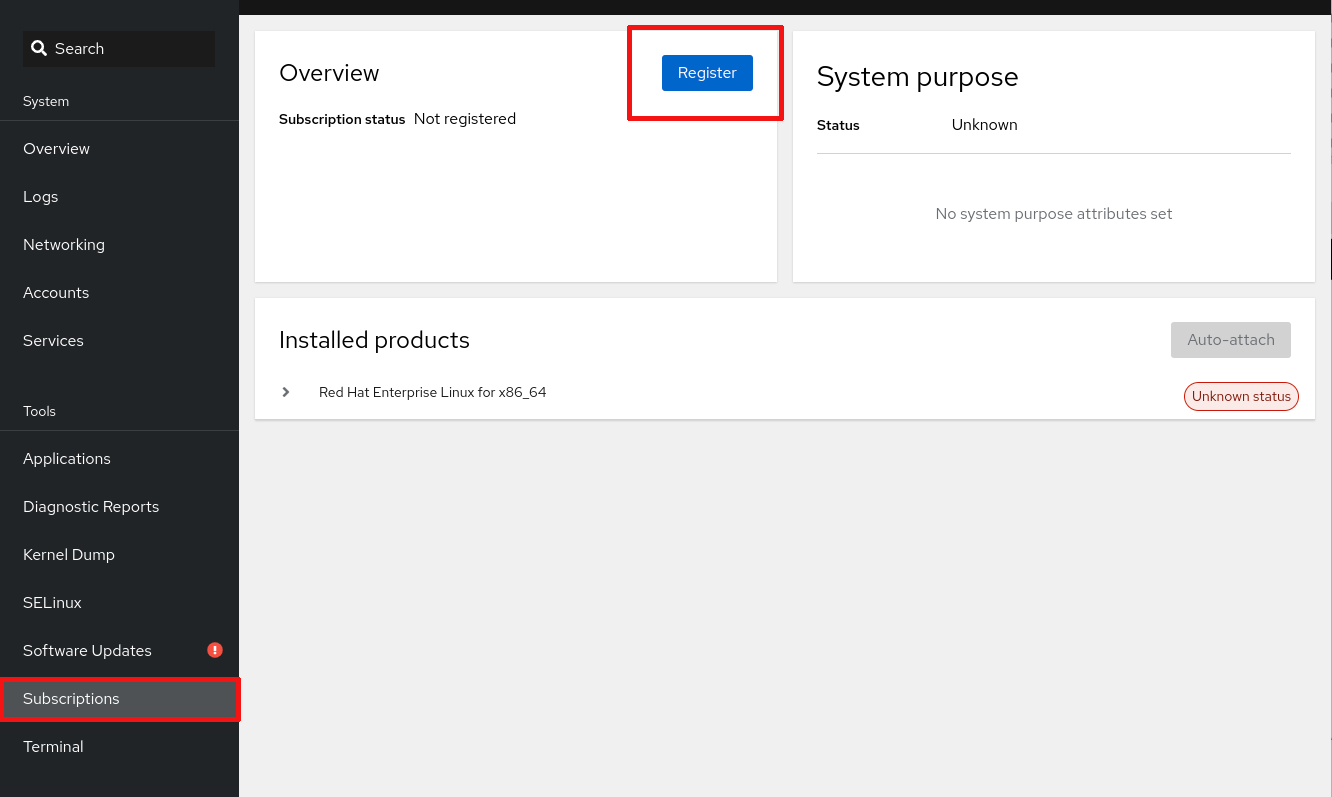 |
The dialog box in the web console is similar to the GNOME application. Provide the login and the password for your Red Hat Customer Portal account and click to register the system. You can then install new software or update your system, according to its attached subscription.
Use the subscription-manager command to register a system without using a graphical environment.
The subscription-manager command automatically attaches a system to the best-matched compatible subscriptions for the system.
Register a system by using the credentials of the Red Hat Customer Portal as the root user:
[root@host ~]#subscription-manager register --usernameRegistering to: subscription.rhsm.redhat.com:443/subscription Password:<yourusername>The system has been registered with ID:yourpassword1457f7e9-f37e-4e93-960a-c94fe08e1b4fThe registered system name is: host.example.com
View available subscriptions for your Red Hat account:
[root@host ~]# subscription-manager list --available
-------------------------------------------
    Available Subscriptions
-------------------------------------------
...output omitted...
Auto-attach a subscription:
[root@host ~]# subscription-manager attach --auto
...output omitted...
Alternatively, attach a subscription from a specific pool from the list of available subscriptions:
[root@host ~]# subscription-manager attach --pool=poolID
...output omitted...
View consumed subscriptions:
[root@host ~]# subscription-manager list --consumed
...output omitted...
Unregister a system:
[root@host ~]# subscription-manager unregister
Unregistering from: subscription.rhsm.redhat.com:443/subscription
System has been unregistered.An activation key is a preconfigured subscription management file that is available for use with both Red Hat Satellite Server and subscription management through the Red Hat Customer Portal.
Use the subscription-manager command with activation keys to simplify the registration and assignment of predefined subscriptions.
This method of registration is beneficial for automating installations and deployments.
For organizations that enable Simple Content Access, activation keys can register systems and enable repositories without needing to attach subscriptions.
Digital certificates store current entitlement information on the local system.
The registered system stores the entitlement certificates under the /etc/pki directory.
/etc/pki/productcertificates indicate installed Red Hat products./etc/pki/consumercertificates identify the Red Hat account for registration./etc/pki/entitlementcertificates indicate which subscriptions are attached.
The rct command inspects the certificates, and the subscription-manager command examines the attached subscriptions on the system.
References
subscription-manager(8) and rct(8) man pages
For further information, refer to Registering the System and Managing Subscriptions at https://access.redhat.com/documentation/en-us/red_hat_enterprise_linux/9/html-single/configuring_basic_system_settings/assembly_registering-the-system-and-managing-subscriptions_configuring-basic-system-settings